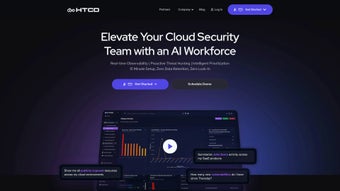

Download HTCD – AI‑Driven Cloud Security Tool
Introduction & Overview
In today’s hyper‑connected enterprises, cloud workloads span dozens of providers, data lakes, and serverless functions. Managing security across that sprawling landscape can feel like trying to guard a city with a handful of streetlights. HTCD (Hybrid Threat Cloud Defender) arrives as a game‑changing, AI‑first cloud security platform that shines a unified, real‑time beam on every corner of your multi‑cloud environment.
Built from the ground up with machine‑learning‑driven analytics, HTCD offers security teams a single pane of glass that combines observability, proactive threat hunting, and automated response. Whether you’re operating on AWS, Azure, Google Cloud, or a hybrid on‑prem data lake, HTCD ingests telemetry, maps it against more than 300 pre‑built security and compliance policies, and instantly surfaces misconfigurations, anomalous behavior, and compliance gaps. What truly sets HTCD apart is its natural‑language detection engine: analysts type plain English questions—“Which S3 buckets are publicly readable?”—and the system translates them into actionable detection code without a single line of script.
This no‑code approach dramatically reduces the time from insight to protection, allowing security operations to move from reactive firefighting to proactive risk mitigation. In addition, HTCD’s intelligent response engine prioritizes findings based on severity, automatically creates remediation playbooks, and feeds each action into an investigative timeline that can be exported as a concise risk report for auditors. By giving you full sovereignty over your data and embedding threat intelligence into a single, secure dashboard, HTCD empowers teams to boost their security posture, increase analyst productivity, and achieve measurable cost savings.
The platform also supports granular role‑based access control, audit‑ready logging, and end‑to‑end encryption, ensuring that even the most regulated industries can adopt it without compromising governance requirements. Overall, HTCD is positioned as a unified, AI‑enhanced shield that not only detects threats faster but also educates security staff through intuitive visualizations and contextual insights, making it a strategic investment for organizations looking to future‑proof their cloud security operations.
Key Features & AI‑Driven Capabilities
HTCD’s feature set reads like a checklist of every capability a modern cloud‑first security team could wish for. At its core, the platform couples AI‑driven analytics with a no‑code detection builder, delivering both depth and speed. Below is a curated list of the most compelling functionalities that make HTCD a must‑have in any cloud security arsenal. Each feature has been engineered to reduce manual effort, improve detection accuracy, and provide actionable remediation pathways, ensuring that security teams can focus on strategic initiatives rather than repetitive triage.
- Real‑time Observability: Continuous ingestion of logs, metrics, and events from AWS CloudTrail, Azure Activity Log, GCP Audit Logs, Kubernetes, and data lake services, visualized on a live dashboard that updates every second.
- 300+ Built‑in Policies: Pre‑defined compliance and security controls covering GDPR, HIPAA, PCI‑DSS, CIS Benchmarks, and industry‑specific standards, automatically mapped to your cloud resources.
- No‑Code Detection Builder: Natural‑language query interface that converts plain English into detection rules, removing the need for scripting expertise while still offering advanced customizations for power users.
- AI‑Powered Threat Hunting: Machine‑learning models surface anomalous patterns, insider threats, and credential misuse before they become incidents, with contextual risk scores that prioritize the most dangerous findings.
- Automated Playbooks: Customizable response workflows that trigger remediation steps, ticket creation, and stakeholder notifications across integrated tools such as ServiceNow, Jira, Slack, and Teams.
- Investigative Timeline: Chronological view of each finding, enriched with context, evidence, and remediation status, allowing auditors and analysts to trace the full lifecycle of an event.
- Unified Risk Reports: Exportable PDFs and CSVs that summarize security posture, compliance gaps, and remediation progress for auditors, executives, and board‑level stakeholders.
- Data Sovereignty Controls: All telemetry can be stored in‑region or on‑prem, ensuring compliance with data residency requirements and giving organizations full control over their sensitive data.
- Threat Intelligence Integration: Real‑time feeds from leading intel sources (e.g., VirusTotal, MITRE ATT&CK, Open Threat Exchange) are correlated with internal findings to provide enriched context.
- Scalable Architecture: Cloud‑native microservices that auto‑scale with workload volume, guaranteeing low latency even during peak ingestion periods, and supporting multi‑tenant deployments for MSSPs.
Pros
- Fast onboarding of new data sources – most integrations work out‑of‑the‑box.
- No‑code detection dramatically reduces time‑to‑detect for non‑engineers.
- AI models continuously improve with each data ingest, reducing false positives.
- Centralized dashboard eliminates the need for multiple security tools.
- Strong compliance coverage speeds up audit preparation.
- Granular RBAC and audit logging satisfy strict governance requirements.
- Multi‑cloud support ensures consistent security posture across providers.
Cons
- Initial pricing may be higher for small startups without a dedicated security budget.
- Learning curve for advanced AI‑tuning features.
- Requires consistent log forwarding from all cloud accounts to achieve full visibility.
- On‑premise agent installation may need additional coordination with IT operations.
- Custom policy development beyond the built‑in library can be time‑consuming.
Installation, Configuration & Compatibility
Deploying HTCD is intentionally straightforward, reflecting its “secure‑by‑default” philosophy. The product is offered as a SaaS solution with optional on‑premise deployment for organizations that need absolute control over data residency. Follow these steps to get HTCD up and running in under an hour, and you’ll quickly see why the platform is praised for its frictionless onboarding experience. The guided wizard walks you through each stage, from account creation to full policy activation, while providing contextual help links and video tutorials for deeper dives.
- Create an Account: Sign up on the HTCD website using a corporate email. You’ll receive a verification link and a temporary API key that grants read‑only access to your cloud environments during the initial setup.
- Connect Cloud Providers: In the HTCD console, navigate to Integrations → Cloud Accounts. Use the built‑in wizards to grant read‑only IAM roles for AWS, Azure, and GCP. The platform automatically discovers services like S3, EC2, Lambda, Azure Blob, and GKE, and begins streaming logs within minutes.
- Configure Data Lake Ingestion: For on‑prem or hybrid data lakes (e.g., Hadoop, Snowflake, Azure Synapse), install the lightweight HTCD agent on a gateway VM. The agent forwards logs over a TLS‑encrypted channel, and you can choose between batch or real‑time streaming based on bandwidth considerations.
- Set Up Alert Channels: Link HTCD to your SIEM, Slack, Teams, or email via webhook URLs. You can also push findings to ticketing systems like ServiceNow, Jira, or PagerDuty, ensuring that alerts reach the right responders instantly.
- Run the No‑Code Detection Wizard: Type a natural‑language query such as “Show me all IAM users with admin privileges not using MFA.” HTCD generates a detection rule, which you can enable with a single click, edit, or schedule for periodic evaluation.
- Validate and Tune: Review the initial findings on the dashboard, adjust policy thresholds, enable automated playbooks for high‑severity alerts, and configure custom notifications for compliance owners.
- Enable Advanced AI Features (Optional): Activate continuous learning mode, which feeds your organization’s telemetry back into the ML models, refining anomaly detection and reducing false‑positive rates over time.
Supported Environments: HTCD’s SaaS offering works on any modern web browser (Chrome, Edge, Firefox, Safari) and requires no client‑side installation. For on‑prem deployments, the agent runs on Windows Server 2016+, Linux distributions with kernel 3.10+ (including Ubuntu, CentOS, Red Hat), and macOS 10.15+. Containerized versions are available for Docker and Kubernetes, enabling seamless integration into CI/CD pipelines and supporting Helm charts for rapid provisioning. The platform also supports API‑first interactions, allowing custom integrations via RESTful endpoints and providing SDKs for Python, Go, and Java.
Security best practices recommend enabling multi‑factor authentication (MFA) on the HTCD console and restricting API keys to IP‑whitelisted ranges. Because HTCD stores telemetry in encrypted storage (AES‑256 at rest, TLS 1.3 in transit), you can meet most regulatory requirements without additional hardening. Additionally, the solution offers built‑in data retention policies, allowing you to purge logs after a configurable period to stay compliant with GDPR’s “right to be forgotten” obligations. For organizations that require on‑premise isolation, HTCD provides an air‑gap deployment package that includes offline installers, signed binaries, and a private update feed, ensuring that even the most security‑sensitive environments can benefit from AI‑driven cloud protection.
FAQ & Conclusion
Is HTCD suitable for small businesses?
Yes. While HTCD shines in large, multi‑cloud enterprises, its modular pricing and no‑code detection make it accessible for SMBs that need rapid visibility without hiring a full security team. The 30‑day free trial provides full feature access, allowing small teams to evaluate ROI before committing.
Can HTCD operate in air‑gapped environments?
The on‑premise version can be deployed behind an air‑gap. All data stays within your network, and updates can be applied via offline installer packages that are digitally signed to ensure integrity.
How does the AI component avoid false positives?
HTCD’s models are trained on millions of benign and malicious events. The platform continuously retrains on your own telemetry, applying context‑aware thresholds that adapt to normal behavior patterns, thereby reducing noise and focusing analyst attention on genuine threats.
What compliance frameworks are covered out of the box?
HTCD includes policies for GDPR, HIPAA, PCI‑DSS, SOC 2, ISO 27001, NIST 800‑53, and industry‑specific standards like CIS Benchmarks for cloud workloads. Additional regulatory modules can be added via the marketplace for sector‑specific needs.
Is there a free trial or community edition?
HTCD offers a 30‑day free trial with full feature access. A limited community edition is also available for non‑commercial use, providing basic observability and detection capabilities without the advanced AI modules.
How does HTCD integrate with existing SIEM and ticketing tools?
HTCD supports native integrations with major SIEM platforms such as Splunk, IBM QRadar, and Elastic Stack, as well as ticketing systems like ServiceNow, Jira, and Zendesk. Integration is performed via configurable webhooks or REST APIs, enabling bi‑directional data flow for enrichment and automated incident creation.
Final Verdict
HTCD delivers a compelling blend of AI‑driven analytics, no‑code detection, and comprehensive compliance coverage that few cloud security tools can match. Its centralized dashboard simplifies the chaotic task of monitoring heterogeneous environments, while automated playbooks and intelligent prioritization keep teams focused on the most critical risks. Organizations that prioritize rapid onboarding, data sovereignty, and cost‑effective risk reduction will find HTCD a strategic investment. For teams still wrestling with fragmented point solutions, HTCD represents a clear path toward a unified, future‑ready security posture. The platform’s extensible architecture, robust API, and strong community support further future‑proof the investment, ensuring that as cloud services evolve, HTCD can adapt without requiring a complete overhaul.
Ready to secure your cloud? Download HTCD now and start a 30‑day free trial. Experience AI‑first protection, accelerate compliance, and empower your analysts to hunt threats with natural language—no code required.



.png)



